

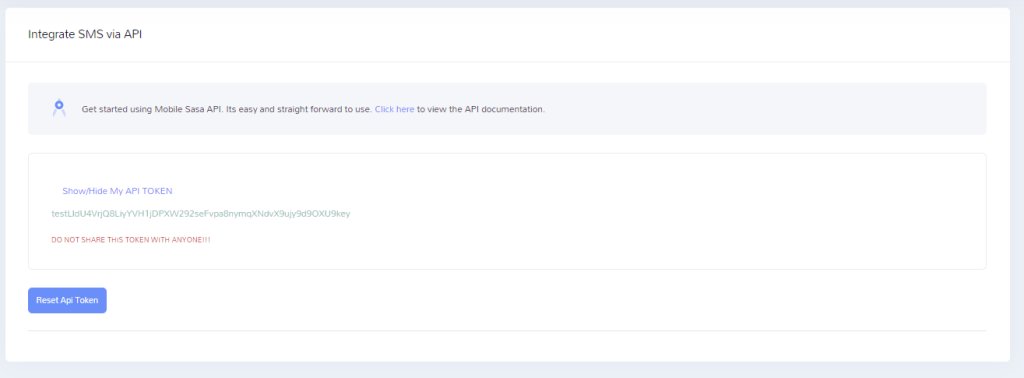
Mobile Sasa APIs offer you a seamless way to automate SMS, short code messages and USSD services. We have implemented plug and play APIs that anyone can connect to to automate communication. To do integrations, you need an API key. To get your API key, log into sms.mobilesasa.com then select "API Integration". Click on "Show/Hide My API TOKEN" link yo get the API key as shown below:
NOTE: Mobile Sasa supports sending SMS to both plain phone numbers (for example, 0722002222) and hashed Safaricom numbers (for example, acd12test4f661ff9b2f81a5b366199292cdf06f2f5913621744da7a24c2fdf011). Simply pass the plain or hashed phone in the phone field and be guaranteed that your message will be delivered.
This end point is used to validate a phone number and convert it to the standard 254******** format. It also indicates the local network that the phone number belongs to. NOTE: you need to have credit in your wallet to validate phone numbers at KES 0.10 per validation.
Base URL: https://api.mobilesasa.com/v1/msisdns/load-details
NOTE: Send a POST request
Pass bearer token as the Authorization header. Also include Accept and Content-Type headers as application/json:
Authorization: Bearer Your-api-token_HERE
Accept: application/json
Content-Type: application/json
{
    "phone": "0782229227"
}
Below is a sample CURL request
curl --location 'https://api.mobilesasa.com/v1/msisdns/load-details' \
--header 'Accept: application/json' \
--header 'Content-Type: application/json' \
--header 'Authorization: Bearer Your-api-token_HERE' \
--data '{
    "phone": "0782229227"
}'
{
    "status": true,
    "responseCode": "0200",
    "networkName": "airtel",
    "formattedPhone": "254782229227"
}
{
    "status": false,
    "responseCode": "0422",
    "message": "Invalid phone number"
}
| Response Parameter | Telco Company |
|---|---|
| safaricom | Safaricom PLC |
| airtel | Airtel Kenya Limited |
| telkom | Telkom Kenya Limited |
| equitel | Equitel (Finserve Africa Limited) |
You can send a single SMS using POST Form data request, Json POST request and GET request
You can send a Json POST Request as shown below:
Base URL: https://api.mobilesasa.com/v1/send/message
Pass bearer token as the Authorization header. Also include Accept and Content-Type headers as application/json:
Authorization: Bearer Your-api-token_HERE
Accept: application/json
Content-Type: application/json
{
    "senderID": "MOBILESASA",
    "message": "Dear Mercy, Your water bill of KES 8,200 is due on 02 Sept 2027. STOP *456*9*5#",
    "phone": "2547078614XX"
}
Below is a sample CURL request
curl --location 'https://api.mobilesasa.com/v1/send/message' \
--header 'Accept: application/json' \
--header 'Content-Type: application/json' \
--header 'Authorization: Bearer Your-api-token_HERE' \
--data '{
    "senderID": "MOBILESASA",
    "message": "Dear customer, thanks for shopping with us! Bonus of 44 added to your a/c.",
    "phone": "25470786XXX"
}'
{
    "status": true,
    "responseCode": "0200",
    "message": "Accepted",
    "messageId": "9b8a028b-f9bb-49f6-bc89-a5214ff1ba93"
}
{
    "status": false,
    "responseCode": "0422",
    "message": "The Sender ID is Invalid!"
}
You can also send a message using a POST request with form data parameters. To do so, send the form data parameters as below:
Base URL: https://api.mobilesasa.com/v1/send/message
NOTE: The parameter names are case sensitive
| Parameter Name | Description | Example |
|---|---|---|
| senderID | Your registered sender ID | MOBILESASA |
| message | Message to be sent to the recipient | This is a sample message |
| phone | Recipient phone number | 254722002222 |
| api_token | Your API key. | Your-api-token_HERE |
{
   "status": true,
   "responseCode": "0200",
   "message": "Accepted",
   "messageId": "9b8a028b-f9bb-49f6-bc89-a5214ff1ba93"
}
{
   "status": false,
   "responseCode": "0422",
   "message": "The Sender ID is Invalid!"
}
You can send an SMS using a GET request. To do so send a request as below:
https://api.mobilesasa.com/v1/send/messageget?senderID=MOBILESASA&message=Test_message&phone=0722002222&api_token=testOlBJzS6K2Obn8ynFIeuOYdDMuLrrpThApDMnI4i4Zxcapikey
{
   "status": true,
   "responseCode": "0200",
   "message": "Accepted",
   "messageId": "9b8a01af-4233-47f5-83f8-7d12c9605e51"
}
{
   "status": false,
   "responseCode": "0401",
   "message": "Unauthenticated"
}
You can broadcast a single SMS to multiple contacts in a single request. It is recommended that you send 50 messages per request. The parameters are as below:
Base URL: https://api.mobilesasa.com/v1/send/bulk
Pass bearer token as the Authorization header. Also include Accept and Content-Type headers as application/json:
Authorization: Bearer Your-api-token_HERE
Accept: application/json
Content-Type: application/json
{
    "senderID": "MOBILESASA",
    "message": "Dear member, this is a reminder that this is a test message for bulk",
    "phones": "07257125xx,2547078614xx"
}
Below is a sample CURL request
curl --location 'https://api.mobilesasa.com/v1/send/bulk' \
--header 'Accept: application/json' \
--header 'Content-Type: application/json' \
--header 'Authorization: Bearer Your-api-token_HERE' \
--data '{
    "senderID": "MOBILESASA",
    "message": "Hello, this is a reminder that our Annual AGm is today at 2PM. Keep time.",
    "phones": "254707XXXXXX,25411XXXXX"
}'
{
    "status": true,
    "responseCode": "0200",
    "message": "Accepted",
    "bulkId": "9b8a0969-b3ea-4ac9-a7c7-a79b53d6b019"
}
{
    "status": false,
    "responseCode": "0422",
    "message": "The Sender ID is Invalid!"
}
This is used to send multiple messages in a single request. Each phone receives a different message. It is recommended that you send 50 messages per request. The parameters are as below:
Base URL: https://api.mobilesasa.com/v1/send/bulk-personalized
Pass bearer token as the Authorization header. Also include Accept and Content-Type headers as application/json:
Authorization: Bearer Your-api-token_HERE
Accept: application/json
Content-Type: application/json
{
    "senderID": "MOBILESASA",
    "messageBody": [
        {
            "phone": "2547078614xx",
            "message": "Vin, your water bill of KES 6700 is due on 23rd."
        },
        {
            "phone": "07267125xx",
            "message": "Hey Faith, your water bill of KES 400 is due today."
        }
    ]
}
Below is a sample CURL request
curl --location 'https://api.mobilesasa.com/v1/send/bulk-personalized' \
--header 'Accept: application/json' \
--header 'Content-Type: application/json' \
--header 'Authorization: Bearer Your-api-token_HERE' \
--data '{
    "senderID": "MOBILESASA",
    "messageBody": [
        {
            "phone": "2547078614xx",
            "message": "Caro, your water bill of KES 6700 is due on 23rd."
        },
        {
            "phone": "2541118810xx",
            "message": "Dear James, your water bill of KES 40100 is due on 31st."
        }
    ]
}'
{
   "status": true,
   "responseCode": "0200",
   "message": "Accepted",
   "bulkId": "9b8a0f37-419d-454d-931d-0f5d4ddc4xxx"
}
{
   "status": false,
   "responseCode": "0422",
   "message": "The Sender ID is Invalid!"
}
This is used to send multiple messages in a single request. Each phone receives a different message. It is recommended that you send 50 messages per request. The parameters are as below:
Base URL: https://api.mobilesasa.com/v1/send/bulk-personalized
Pass bearer token as the Authorization header. Also include Accept and Content-Type headers as application/json:
Authorization: Bearer Your-api-token_HERE
Accept: application/json
Content-Type: application/json
{
    "senderID": "MOBILESASA",
    "messageBody": [
        {
            "phone": "2547078614xx",
            "message": "Vin, your water bill of KES 6700 is due on 23rd."
        },
        {
            "phone": "07267125xx",
            "message": "Hey Faith, your water bill of KES 400 is due today."
        }
    ]
}
Below is a sample CURL request
curl --location 'https://api.mobilesasa.com/v1/send/bulk-personalized' \
--header 'Accept: application/json' \
--header 'Content-Type: application/json' \
--header 'Authorization: Bearer Your-api-token_HERE' \
--data '{
    "senderID": "MOBILESASA",
    "messageBody": [
        {
            "phone": "2547078614xx",
            "message": "Caro, your water bill of KES 6700 is due on 23rd."
        },
        {
            "phone": "2541118810xx",
            "message": "Dear James, your water bill of KES 40100 is due on 31st."
        }
    ]
}'
{
   "status": true,
   "responseCode": "0200",
   "message": "Accepted",
   "bulkId": "9b8a0f37-419d-454d-931d-0f5d4ddc4xxx"
}
{
   "status": false,
   "responseCode": "0422",
   "message": "The Sender ID is Invalid!"
}
You can register a callback URL on your account to receive delivery status of messages sent out. To do so, go to "Company Management" then "View/Update Details" to update your callback URL. The following Json payload will be sent to your end point.
{
   "deliveryStatus": "DeliveredToTerminal",
   "deliveryTime": "2024-03-12 11:52:47",
   "reference": "9b8b7a66-abbc-44bd-9098-4331fb264400",
   "msisdn": "25470xxxxxx",
   "cost": "0.12"
}
You can query delivery status of a message using the message id generated when sending a message:
Base URL: https://api.mobilesasa.com/v1/dlr
Pass bearer token as the Authorization header. Also include Accept and Content-Type headers as application/json:
Authorization: Bearer Your-api-token_HERE
Accept: application/json
Content-Type: application/json
{
    "messageId": "9b899e2d-fde0-4361-997b-b802364ff736"
}
Below is a sample CURL request
curl --location 'https://api.mobilesasa.com/v1/dlr' \
--header 'Accept: application/json' \
--header 'Content-Type: application/json' \
--header 'Authorization: Bearer Your-api-token_HERE' \
--data '{
    "messageId": "9b899e2d-fde0-4361-997b-b802364ff736"
}'
{
   "status": true,
   "responseCode": "0200",
   "messages": [
      {
         "phone": "254705xxxxxx",
         "message": "Your MobileSasa login OTP is 446679 and will expire at 2024-03-11 13:46:06",
         "parts": 1,
         "cost": "0.80",
         "sentTime": "2024-03-11 13:41:07",
         "deliveryStatus": {
            "status": "DeliveredToTerminal",
            "deliveryTime": "2024-03-11 13:41:11"
         }
      }
   ]
}
{
    "status": false,
    "responseCode": "0422",
    "message": "No messages found"
}
| Delivery Status | Description |
|---|---|
| DELIVRD/Delivered/DeliveredToTerminal | Message successfully delivered to recipient |
| ACCEPTED | Message accepted by network provider but delivery unknown |
| EXPIRED | Message took long to be delivered and expired. Occurs when number is unreachable |
| ENROUTED | The message is currently being delivered and awaiting delivery receipt confirmation from the carrier. |
| Sent | Message is successfully sent awaiting delivery status |
| UNDELIV | Failed to deliver |
| DELETED | The message has failed due to "Barred", "Absent Subscriber", or "Delivery Failure". |
| UNDELIVERABLE | Message cannot reach recipient |
| UNKNOWN | No delivery status was received after a specific amount of time therefore delivery is not known |
| REJECTED | The message was successfully submitted to the carrier for delivery but has actively been refused. |
| Undelivered | After attempting for a period of time, the carrier has failed to deliver the message to the destination handset. Please confirm the recipient's number is correct, and the handset is on and within reception range. |
| BLACKLISTED/SenderName Blacklisted | Promotional message has been blocked by recipient |
| AbsentSubscriber/Absent Subscriber | Phone number does not exist |
| DeliveryImpossible/Delivery Impossible | Message cannot be delivered |
| Network Failure | A network issue has caused delivery failure |
You can get the SMS balances for both local and international accounts using this end point. It also gives you the local and international accounts numbers used for payments.
NOTE: Send a GET request to get balance
Base URL: https://api.mobilesasa.com/v1/get-balance
Pass bearer token as the Authorization header. Also include Accept and Content-Type headers as application/json:
Authorization: Bearer Your-api-token_HERE
Accept: application/json
Content-Type: application/json
Json body should be empty
Below is a sample CURL request
curl --location 'https://api.mobilesasa.com/v1/get-balance' \
--header 'Accept: application/json' \
--header 'Content-Type: application/json' \
--header 'Authorization: Bearer Your-api-token_HERE'
{
    "status": true,
    "responseCode": "0200",
    "balance": 3245,
    "internationalBalance": 100,
    "localAccountNumber": "testlocal",
    "internationalAccountNumber": "IN-test",
    "emailWhatsAppAccountNumber": "EW-test",
    "walletAccountNumber": "WL-test"
}
{
    "status": false,
    "responseCode": "0401",
    "message": "Unauthenticated"
}
You can get details about your registered sender IDs. The information includes the sender name, sender type (promotional or transactional), date created and status. It also includes gateways registered.
This is used to get a single sender ID details
Base URL: https://api.mobilesasa.com/v1/senders/load-details
Pass bearer token as the Authorization header. Also include Accept and Content-Type headers as application/json:
Authorization: Bearer Your-api-token_HERE
Accept: application/json
Content-Type: application/json
{
    "senderID": "MOBILESASA"
}
Below is a sample CURL request
curl --location 'https://api.mobilesasa.com/v1/senders/load-details' \
--header 'Accept: application/json' \
--header 'Content-Type: application/json' \
--header 'Authorization: Bearer Your-api-token_HERE' \
--data '{
    "senderID": "MOBILESASA"
}'
{
    "status": true,
    "responseCode": "0200",
    "payload": {
        "senderID": "BITWISE",
        "senderType": "Promotional",
        "senderStatus": "Active",
        "senderCreatedAt": "2021-04-30 18:22:18",
        "senderGateways": [
            "Safaricom",
            "Airtel"
        ]
    }
}
Sender Type is either Promotional or Transactional. senderGateways are the networks on which the sender is mapped.
{
    "status": false,
    "responseCode": "0401",
    "message": "Unauthenticated"
}
This is used to get all registered sender ID details
Base URL: https://api.mobilesasa.com/v1/senders/load-all
Pass bearer token as the Authorization header. Also include Accept and Content-Type headers as application/json:
Authorization: Bearer Your-api-token_HERE
Accept: application/json
Content-Type: application/json
Json body should be empty
Below is a sample CURL request
curl --location 'https://api.mobilesasa.com/v1/senders/load-all' \
--header 'Accept: application/json' \
--header 'Content-Type: application/json' \
--header 'Authorization: Bearer Your-api-token_HERE' \
--data ''
{
    "status": true,
    "responseCode": "0200",
    "payload": [
        {
            "senderID": "SENDER1",
            "senderType": "Transactional",
            "senderStatus": "Active",
            "senderCreatedAt": "2021-03-19 12:08:44",
            "senderGateways": ["Safaricom", "Airtel"]
        },
        {
            "senderID": "SENDER2",
            "senderType": "Promotional",
            "senderStatus": "Active",
            "senderCreatedAt": "2021-04-30 18:22:18",
            "senderGateways": ["Safaricom", "Airtel"]
        },
        {
            "senderID": "SENDER3",
            "senderType": "Transactional",
            "senderStatus": "Active",
            "senderCreatedAt": "2021-05-25 17:10:42",
            "senderGateways": ["Safaricom", "Airtel", "Airtouch (Telkom)"]
        }
    ]
}
Sender Type is either Promotional or Transactional. senderGateways are the networks on which the sender is mapped.
{
    "status": false,
    "responseCode": "0401",
    "message": "Unauthenticated"
}
Short codes are 5-digit numbers such as 23358 that provide two way SMS communication. This enables an organization to automate communication via SMS. This can be used to provide feedback, perform customer care functions among many other uses.
You can receive SMS details sent to the short code by providing us a callback URL where the details are sent to. A Json payload is sent to the end point as below:
{
   "reference": "0128b6d6-db68-4bc2-868d-4acc0c93c72a",
   "shortCode": "23358",
   "msisdn": "254723xxxxxx",
   "message": "This is a sample message",
   "receivedAt": "20240312095937"
}
The parameters are explained below:
| Parameter Name | Description | Example |
|---|---|---|
| reference | The unique identifier of the message | 0128b6d6-db68-4bc2-868d-4acc0c93c72a |
| shortCode | Your registered short code number | 23358 |
| msisdn | Sender phone number | 254722002222 |
| message | Message sent by the sender | This is a sample message |
| receivedAt | Time the message was sent by sender | 20240312095937 |
To enable sending out short code messages, for example, to automate replies, the short code is registered as an SMS sender ID. You can therefore send out SMS using the send SMS options explained in the first section and use the short code as the senderId.
Groups are used to segment contacts. A group can have contacts with phone, name and email. You can add and delete contacts from group.
This is used to get a list of registered groups in an account.
NOTE: Send a GET request to get groups
Base URL: https://api.mobilesasa.com/v1/groups
Pass bearer token as the Authorization header. Also include Accept and Content-Type headers as application/json:
Authorization: Bearer Your-api-token_HERE
Accept: application/json
Content-Type: application/json
Json body should be empty
Below is a sample CURL request
curl --location 'https://api.mobilesasa.com/v1/groups' \
--header 'Accept: application/json' \
--header 'Content-Type: application/json' \
--header 'Authorization: Bearer Your-api-token_HERE'
{
    "status": true,
    "responseCode": "0200",
    "groups": [
        {
            "groupId": "9b51731e-2ed4-4649-8ba8-7be1c4a56345",
            "name": "Test Group"
        }
    ]
}
{
    "status": false,
    "responseCode": "0401",
    "message": "Unauthenticated"
}
You can automatically add contacts to group. If the contact (phone number) exists, the name and email will be updated
Base URL: https://api.mobilesasa.com/v1/groups/GROUP-UUID-HERE/add-contact
NOTE: The group UUID should be passed in the URL. Send a POST request
Pass bearer token as the Authorization header. Also include Accept and Content-Type headers as application/json:
Authorization: Bearer Your-api-token_HERE
Accept: application/json
Content-Type: application/json
{
    "phone": "0705xxxxxx",
    "name": "Test Contact",
    "email": "aguvasucyril@gmail.com"
}
Below is a sample CURL request
curl --location 'https://api.mobilesasa.com/v1/groups/GROUP-UUID-HERE/add-contact' \
--header 'Accept: application/json' \
--header 'Content-Type: application/json' \
--header 'Authorization: Bearer Your-api-token_HERE' \
--data '{
    "phone": "0705xxxxxx",
    "name": "Test Contact",
    "email": "test@gmail.com"
}'
{
    "status": true,
    "responseCode": "0200",
    "message": "Contact Added"
}
{
    "status": false,
    "responseCode": "0401",
    "message": "Unauthenticated"
}
You can automatically delete contact from group.
Base URL: https://api.mobilesasa.com/v1/groups/GROUP-UUID-HERE/remove-contact
NOTE: The group UUID should be passed in the URL. Send a DELETE request
Pass bearer token as the Authorization header. Also include Accept and Content-Type headers as application/json:
Authorization: Bearer Your-api-token_HERE
Accept: application/json
Content-Type: application/json
{
    "phone": "0705xxxxxx"
}
Below is a sample CURL request
curl --location 'https://api.mobilesasa.com/v1/groups/GROUP-UUID-HERE/remove-contact' \
--header 'Accept: application/json' \
--header 'Content-Type: application/json' \
--header 'Authorization: Bearer Your-api-token_HERE' \
--data '{
    "phone": "0705xxxxxx"
}'
{
    "status": true,
    "responseCode": "0200",
    "message": "Contact deleted!"
}
{
    "status": false,
    "responseCode": "0401",
    "message": "Unauthenticated"
}
Birthday/Anniversary groups are used to segment birthdays. Each group can have a different message and time to send. You can add and delete contacts from group.
This is used to get a list of registered Birthday/Anniversary groups in an account.
NOTE: Send a GET request to get groups
Base URL: https://api.mobilesasa.com/v1/anniversary-groups
Pass bearer token as the Authorization header. Also include Accept and Content-Type headers as application/json:
Authorization: Bearer Your-api-token_HERE
Accept: application/json
Content-Type: application/json
Json body should be empty
Below is a sample CURL request
curl --location 'https://api.mobilesasa.com/v1/anniversary-groups' \
--header 'Accept: application/json' \
--header 'Content-Type: application/json' \
--header 'Authorization: Bearer Your-api-token_HERE'
{
    "status": true,
    "responseCode": "0200",
    "groups": [
        {
            "groupId": "4ce17108-e08f-4353-87ad-180166db8bba",
            "name": "Test Anniversary1",
            "description": "Testing anniversaries",
            "contactsCount": 3
        },
        {
            "groupId": "38abc713-c7c4-445c-ba05-ab9ecca64b7b",
            "name": "Test Anniversary2",
            "description": "All Bitwise Staff",
            "contactsCount": 7
        },
        {
            "groupId": "277947fc-b606-46fb-9d54-c7e195a110ac",
            "name": "Test Anniversary3",
            "description": "birthdays",
            "contactsCount": 1
        },
        {
            "groupId": "17194005-e137-4568-9b4b-0970b23d652d",
            "name": "Test Anniversary4",
            "description": "These are my friends.",
            "contactsCount": 7
        }
    ]
}
{
    "status": false,
    "responseCode": "0401",
    "message": "Unauthenticated"
}
You can automatically add a birthday/anniversary date to a group. If the contact (phone number) exists, the name and date will be updated
Base URL: https://api.mobilesasa.com/v1/anniversary-groups/GROUP-UUID-HERE/add-contact
NOTE: The group UUID should be passed in the URL. Send a POST request
Pass bearer token as the Authorization header. Also include Accept and Content-Type headers as application/json:
Authorization: Bearer Your-api-token_HERE
Accept: application/json
Content-Type: application/json
{
    "phone": "0705xxxxxx",
    "name": "John Doe",
    "date": "25-12-1990"
}
Below is a sample CURL request
curl --location 'https://api.mobilesasa.com/v1/anniversary-groups/GROUP-UUID-HERE/add-contact' \
--header 'Accept: application/json' \
--header 'Content-Type: application/json' \
--header 'Authorization: Bearer Your-api-token_HERE' \
--data '{
    "phone": "0705xxxxxx",
    "name": "Test Contact",
    "date": "25-12-1990"
}'
{
    "status": true,
    "responseCode": "0200",
    "message": "Contact Updated"
}
{
    "status": false,
    "responseCode": "0401",
    "message": "Unauthenticated"
}
You can automatically delete contact from group.
Base URL: https://api.mobilesasa.com/v1/anniversary-groups/GROUP-UUID-HERE/remove-contact
NOTE: The group UUID should be passed in the URL. Send a DELETE request
Pass bearer token as the Authorization header. Also include Accept and Content-Type headers as application/json:
Authorization: Bearer Your-api-token_HERE
Accept: application/json
Content-Type: application/json
{
    "phone": "0705xxxxxx"
}
Below is a sample CURL request
curl --location 'https://api.mobilesasa.com/v1/anniversary-groups/GROUP-UUID-HERE/remove-contact' \
--header 'Accept: application/json' \
--header 'Content-Type: application/json' \
--header 'Authorization: Bearer Your-api-token_HERE' \
--data '{
    "phone": "0705xxxxxx"
}'
{
    "status": true,
    "responseCode": "0200",
    "message": "Contact deleted!"
}
{
    "status": false,
    "responseCode": "0401",
    "message": "Unauthenticated"
}
USSDs are numbers such as *657# that are used to provide interactive menus for users to access certain functions. It can be used by financial institutions to provide self-service functions such as balance enquiry, loan application, payments etc
Bank
CHEQUES, CASH DEPOSITS, EFT
A/C Name: ORACOM WEB SOLUTIONS LIMITED
Mpesa
Till ,Paybill
Copyright © 2026 Oramobile -All rights reserved.
Chat on Whatsapp
